The 2.99-pound XPS 13 Developer Edition -- started as a project to create an open source developer laptop -- is now available on Dell's site for $1,549.
Those specifications, with the critical exception of the Ubuntu Linux, are identical to the 1080p XPS 13 for Windows 8.
Here are the specs:
Operating system: Ubuntu Linux 12.04 LTS
Display: 13.3-inch 1,920x1,080 panel
Processor: 3rd Generation Intel Core i7-3537U
Memory: 8GB2 DDR3 SDRAM at 1600MHz
Storage: 256GB solid-state drive
Graphics: Intel HD 4000
Price: $1,549
In addition to the U.S., Dell will also start to roll it out in select countries in Europe, including the UK, France, Germany, Austria, Belgium, Denmark, and Finland.
The XPS 13 is one of the better ultrabook designs to emerge from a top-tier PC vendor. It squeezes a 13.3-inch screen into a footprint more typical of 12-inch laptops, boasts Gorilla Glass, and is constructed from aluminum and carbon fiber, allowing Dell to keep the weight to just under three pounds.
The upgraded display is also brighter and has wider viewing angles than the original 1,366x768 XPS 13 model.
Facebook, WhatsApp and Instagram coming back online after widespread outage
Facebook, WhatsApp and Instagram coming back online after widespread outage
Facebook, WhatsApp and Instagram are starting to come back online after a widespread outage lasted more than six hours on Monday, disrupting communications for the company's roughly 3 billion users.
"To the huge community of people and businesses around the world who depend on us: we're sorry. We've been working hard to restore access to our apps and services and are happy to report they are coming back online now. Thank you for bearing with us," Facebook said in a tweet.
The three social networks -- all owned by Facebook -- started having issues around 11:40 a.m. ET, according to Down Detector, a crowdsourced website that tracks online outages.
The company acknowledged that it was having issues shortly after noon ET, saying in a tweet from its WhatsApp account that it's "working to get things back to normal and will send an update here as soon as possible." Similar messages were shared on the Twitter accounts for Facebook and Facebook Messenger.
Hours later, Facebook CTO Mike Schroepfer said in a tweet that the company was "experiencing networking issues" and working as fast as possible "debug and restore" its services.
Facebook later said in a company blog that it believed a "faulty configuration" change was the cause of the outage
The outage -- and the resulting reaction on Twitter -- underscores both our dependency on the social networks and the love-hate relationship they inspire. Being unable to post on Facebook or Instagram elicited equal parts frustration and relief, with some relishing the break from being constantly connected to our digital lives. Ironically, it's those very social media platforms that allow us to express our collectively mixed feelings about the situation.
Outages are nothing new in the online world, and services often go offline or experience slowdowns. Facebook's outage on Monday, however, was unusual in that it struck a suite of the company's products, including its central site and WhatsApp, an encrypted messaging service used widely around the world. Facebook is deeply enmeshed in global infrastructure and the outage disrupted communications for the company's billions of users. The website and its services are used for everything from casual chatting to business transactions.
It isn't immediately clear what caused the issue for the three properties. Security expert Brian Krebs said it appears to be a DNS related-issue, adding that something "caused the company to revoke key digital records that tell computers and other Internet-enabled devices how to find these destinations online."
Cloudflare, a content delivery network that hosts customers data for fast access around the world, had its own explanation of what might have happened.
"Facebook and its sites had effectively disconnected themselves from the Internet," Cloudflare concluded. "It was as if someone had 'pulled the cables' from their data centers all at once and disconnected them from the internet.
Facebook's problem involved a combination of two fundamental internet technologies, BGP and DNS, both instrumental to helping computing devices to connect across the network. The Border Gateway Protocol (BGP) helps establish the best way to send data hopping from one device to another until it reaches its final destination. The Domain Name System (DNS) translates human comprehensible network names like facebook.com into the numeric Internet Protocol (IP) addresses that actually are used to address and route data across the internet.
Just before 9 a.m. PT, Cloudflare detected a flurry of unusual updates from Facebook describing changes to how BGP should handle Facebook's part of the network. Specifically, the updates cut off network routes to Facebook's DNS servers. With those servers offline, typing "facebook.com" in a browser or using the app to try to reach Facebook failed.
In addition to Facebook's services and apps being down, some of the company's internal tools were also reportedly impacted by the outage. Instagram CEO Adam Mosseri said in a tweet that it felt like a "snow day."
The Facebook outage appears to have caused a headache for Twitter, as well, with more people heading there after finding Facebook down.
"Sometimes more people than usual use Twitter," Twitter tweeted Monday afternoon. "We prepare for these moments, but today things didn't go exactly as planned."
The outage cost Facebook an estimated $60 million in forgone revenue as of 1 p.m. PT/4 p.m. ET, according to Fortune and Snopes. The two publications calculated the lost revenue by using the roughly $29 billion the company reported in its second-quarter earnings. Facebook makes roughly $319.6 million per day in revenue, $13.3 million per hour, $220,000 per minute, and $3,700 per second. The outlets then used those numbers to calculate revenue loss based on how long the outage has lasted.
Shares in the social network dropped nearly 5% to $326.23 per share amid a broad selloff in social media stocks. (Shares of Twitter and Snap were both off more than 5%.)
The slide in Facebook stock weighed on CEO Mark Zuckerberg's net worth, which dropped to $121.6 billion. His net worth is now less than Microsoft co-founder Bill Gates and is the fifth wealthiest person in the world, according to Bloomberg.
The outage creates another headache for Facebook, which is battling a massive public relations nightmare in the wake of a whistleblower's allegations that the social network is aware of harm that content on its services causes. The allegations were detailed in a series of stories published by The Wall Street Journal based on research leaked by the whistleblower that said the company ignored research about how Instagram can harm teen girls and that an algorithm change made users angrier.
The whistleblower, a former Facebook product engineer named Frances Haugen, is scheduled to testify to Congress on Tuesday. She detailed some of her allegations in a televised interview on Sunday.
"Facebook, over and over again, chose to optimize for its own interests, like making more money," she told 60 Minutes' Scott Pelley.
As is often the case with outages, users flocked to other social networks to complain and also revel in the Facebook outage. Instagram and Facebook quickly became the top trending topic on Twitter in the US, and dominated other locations around the world as well. Twitter even got in on the joke, with the company's official account tweeting, "Hello literally everyone," and CEO Jack Dorsey asking "how much?" in response to tweets suggesting Facebook's domain was for sale.
This isn't the first time Facebook has suffered from a lengthy outage. In 2019, Facebook's services suffered from a daylong outage that the company blamed on a "server configuration issue." In previous outages, the social network has also cited a DNS issue or a central software problem as causes.,
Read more: Funniest memes and jokes about Facebook, WhatsApp and Instagram outage
CNET has contacted Facebook for additional comment and we'll update when we hear back.
CNET's Carrie Mihalcik and Stephen Shankland contributed to this report.
11 amazing Starbucks coffee drinks you can make at home. Here's how
11 amazing Starbucks coffee drinks you can make at home. Here's how
Missing the ease of your daily Starbucks coffee fix? So are we, especially the secret menu. Even while coronaviruslockdowns have made it difficult to actually go out to grab the real thing, copycat recipes are close enough to hit the spot and save you a few bucks if you don't want to pay for Starbucks delivery (though we do hope you tip generously when you do).
Pretty soon you'll be able to make some of the most classic Starbucks drinks -- hot or iced -- from the comfort of your own home. And if you buy all the ingredients up front, you'll probably save money on coffee in the long run, which is a huge plus.
Caveat: If you don't already have some of the special syrups mentioned below at home, expect shipping delays when you order online -- or you can take the extra step and make those, too. Try this vanilla syrup recipe (don't stress if you only have extract, but add a little extra), and this homemade caramel syrup recipe, and you'll be all set. And if you want to try a totally new kind of coffee, the dalgona coffee craze is worth the hype.
Read more: Best coffee makers for cold brew at home
Caramel Frappuccino
This is the perfect drink for a hot day (or a cheat day), and it's the drink that got me hooked on Starbucks years before I discovered my need for pure shots of bitter espresso straight into my bloodstream. And this Caramel Frappuccino recipe was actually featured on Good Morning America, so you know it's a good copycat! You can use espresso shots or strongly brewed coffee, and any milk you like. You'll also need both caramel sauce and caramel syrup, but the xanthan gum is optional (it's there to thicken things up for the ideal frappe kind of texture, but adding more ice works just as well).
Because you're the barista, feel free to get even more generous with the caramel. For authenticity, top it off with some whipped cream and a little caramel sauce drizzle.
Read more: Best home espresso machines for 2020
Cold brew with salted cream cold foam
If you want a more restrained but equally refreshing option that still satisfies the craving for a little something sweet (and salty), this simple cold brew with creamy, salted sweet foam is perfect. This copycat salted cream cold foam cold brew recipe promises everything you love about the drink, except the instant gratification part, since you'll need to steep your cold brew for about 18 hours.
Read more: The one thing you're getting wrong when making cold brew
Pumpkin spice latte
The fall-time favorite, which I admittedly have still never tried, has become synonymous with Starbucks, so I'd be certifiably insane to not teach you how to make it at home. That way, you could start every day with a PSL. And, you're saving even more money because this copycat Pumpkin Spice Latte recipe even teaches you how to make your own syrup. You're so welcome.
For the latte itself, you'll want to start by heating your milk for one minute and then frothing it a bit with a blender or whisk. Put your syrup at the bottom of your cup, then add your coffee and frothed milk. For that PSL effect, top with whipped cream and some pumpkin pie spice.
Read more: The best coffee accessories you never knew you needed
White chocolate mocha
This is actually one of Starbucks' most popular drinks. It's my go-to when I'm craving something very sweet, and it's the everyday order of none other than Kim Kardashian West. Celebrities, they're just like us. This white chocolate mocha recipe calls for about 3 tablespoons of white chocolate chips rather than syrup, but if you like it much sweeter, just add more chocolate! Make sure to whisk often when heating your coffee, milk and chocolate, and don't skip the whipped cream and chocolate shavings on top.
Read more: What Is white chocolate, exactly?
Vanilla latte
Hot or iced, the Starbucks vanilla latte is my thing. It's so simple, yet so delicious. It's even perfect with any kind of milk -- regular, soy, coconut, you name it! And this one is so easy, you don't even need a recipe. Froth your favorite milk with a whisk or blender, add your preferred espresso or strong coffee and pick up some vanilla syrup from your local grocery store. When summer comes around again, I strongly suggest making this over some ice.
Iced caramel macchiato
Perhaps the most Instagram-worthy drink on this list, the iced caramel macchiato looks difficult because the espresso is so beautifully layered on the milk, but I promise it's super simple, thanks to this Iced Caramel Macchiato recipe.
You'll need to get vanilla syrup and caramel syrup too (if you want things sweeter), plus some some caramel sauce for the bottom of your cup (OK, and the top). When pouring in your espresso, go slowly and the coffee will layer naturally on top of the milk. I know a lot of people choose to mix that until they blend, but I actually enjoy it separated.
Read more:These are the best coffee makers of 2020
Passion tea lemonade
In what is perhaps the most basic thing in the world, I stop in a Starbucks drive through once a week every summer on the way to beach volleyball for one of these things. The passion tea lemonade is as addicting as it is delicious, and I think it's just as good unsweetened.
For this Copycat Starbucks Passion Tea Lemonade recipe, you'll need the straight up passion tea that Starbucks makes. But good news, they sell it in stores and in bulk online! You'll need to boil water and steep the tea first and foremost, because tea just doesn't dissolve to its fullest in cold water. You'll also need to add the sugar in now (if you so choose) for the same reason; it'll dissolve much better in hot tea. When you've boiled water and you're satisfied with your tea, refrigerate it for a little while. When it's ready, fill your cup with ice. The recommended ratio for the passion tea lemonade is one part tea, two parts lemonade. That way it'll be naturally sweet.
The Pink Drink
Closely related to the above thirst quencher, the equally Instagram-friendly Pink Drink is made from passion fruit, acai, strawberries, and coconut milk. This copycat Starbucks Pink Drink recipe has a base of acai berry tea and uses white grape juice to help sweeten it and intensify the fruity flavor. Adjust the sweetness to taste with agave nectar (you'll need a LOT if you want it as sweet as Starbucks) and add coconut milk to give it that pale blushing color and creamy texture. Sliced strawberries top it off.
Chai tea latte
This drink is one of Starbucks' bestsellers, and I STILL haven't tried it. There used to be a time when I would leave for Starbucks and my dad would always yell, "Get me a chai tea latte," so this is the first one on this list I'm dying to make for myself. While Starbucks sells Tazo tea cups for your Keurig, it's a little more fun to run down the spice aisle at the store and get everything you need to follow this DIY Starbucks chai tea latte recipe. You'll need cinnamon, cardamom, nutmeg, cloves and ginger, plus honey, black tea and milk (and water, of course).
Peppermint mocha
Shout out to this copycat Starbucks peppermint mocha recipe for making it possible for me to enjoy a piping hot peppermint mocha even in the middle of July. Isn't that what everyone wants? Use milk or dark chocolate, or mix them both for multilayered flavor. And do not confuse the peppermint extract with mint extract; peppermint is a strong flavor, so use to your taste, but the recommended amount is anywhere between an eighth and a quarter of a teaspoon. Personally, I think the chocolate makes this drink plenty sweet, but feel free to experiment with additional sugar, honey, agave or any other kind of sweetener you may want.
To get really festive, top it with whipped cream and crushed candy canes (which, I'll admit, may be hard to find now that Christmas is long gone. I won't tell anyone if you use the peppermint candies from your grandma's house in the off season).
Flat white
The wildly popular flat white got me through midterms and finals week in college. I'm not kidding. Now you'll know how to make something to get through all your stress and exhaustion! The key to a successful flat white is a fine, frothy milk. If you actually have a frother, now is the time to use it! If not, you can blend or whisk the milk until it froths. All you need to do is pour the milk over the coffee when you're satisfied with the froth. Stir in sugar to taste, but this is a drink that I think is actually better without the sweetener.
This story was written by Toniann Pasqueralle for Chowhound.
HP Envy TouchSmart Ultrabook 4 review: A solid mainstream touch-screen Win 8 laptop
HP Envy TouchSmart Ultrabook 4 review: A solid mainstream touch-screen Win 8 laptop
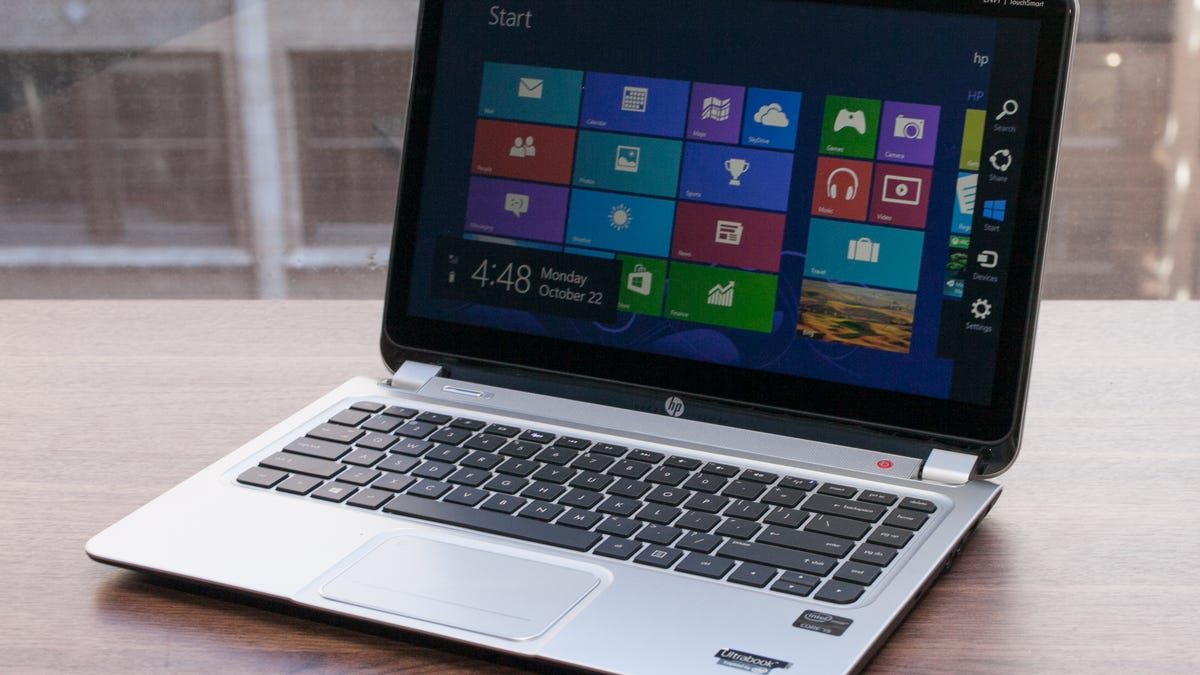
Laptops with touch screens aren't new territory for HP. Windows 8 and its touch-friendly interface, however, gives consumers more of a reason to have one, even on traditional laptop designs like the HP Envy TouchSmart Ultrabook 4 (4t-1100 series to be precise).
It looks like a pretty standard laptop, albeit a nice-looking one, with brushed black metal on the outside with nothing but a simple HP logo decorating the lid. There's silver trim around the outside, giving you a hint about the brushed silver metal inside surrounding the keyboard.
The ultrabook branding may make you think the Envy is especially thin and light; it is not. However, at a little less than an inch thick and weighing 4.5 pounds, it's certainly not huge and heavy.
Sarah Tew/CNET
Open it up and you'll see there's barely a bezel around the 14-inch touch screen, so you can more easily take advantage of Windows 8's active edges for opening the Charms bar, closing apps, or flipping through your open windows. The screen's hinges are fairly stiff, but there is still some bounce when tapping and swiping the screen (just how much depends on the angle of the screen and strength of your taps). It does not go all the way flat, so drawing or writing or using the onscreen keyboard isn't a great experience; a Windows 8 tablet or something like the Dell XPS 12 would be a better choice.
For those expecting a 1,920x1,080-pixel resolution display, you'll have to spend more money for the HP Spectre XT TouchSmart; the Envy's resolution is 1,366x768 pixels, which is what we're seeing on many sub-$1,000 ultrabooks. The quality is good with nice color and contrast, though it does invert when you're looking up at it. Off-angle viewing to the sides is fine, though.
Sarah Tew/CNET
The keyboard is shallow, so there's not much key travel. But that can be said of many ultrabooks with island-style keyboards; it's something that gets sacrificed with slimmer bodies. It's otherwise a nice keyboard, with big, square well-spaced keys.
The touch pad is big, but it lacks discrete mouse buttons. Instead you'll just see a line sectioning off the bottom of the pad for left and right clicks. The touch pad is a bit too sensitive to brushes from your palm when typing at the default settings, but it can be adjusted somewhat with its software. A double tap in the upper left corner quickly shuts the pad off.
Sarah Tew/CNET
You can also turn on and off multitouch gestures for pinch-to-zoom, rotate, and two-finger scrolling. And for those times when you don't feel like getting fingerprints on your screen, you can use the touch pad for the active edge functions of Windows 8, such as bringing up the Charms bar.
The speakers are under a grill above the keyboard and are fine for casual listening. They're capable of pushing out decent audio, but, regardless of their Beats Audio processing, you won't mistake them for a good set of external speakers.
Above the screen is an HP TrueVision HD Webcam. It works well with the bundled Cyberlink YouCam software, but you'll still want good lighting to avoid noise and off colors.
Sarah Tew/CNET
HP Envy TouchSmart 4
Average for category [14-inch]
Video
HDMI
VGA plus HDMI or DisplayPort
Audio
Stereo speakers, headphone/microphone jacks
Stereo speakers, headphone/microphone jacks
Data
2 USB 3.0, 1 USB 2.0, SD card reader
2 USB 2.0, 1 USB 3.0, SD card reader
Networking
Ethernet, Bluetooth, 802.11n Wi-Fi
Ethernet, 802.11n Wi-Fi, Bluetooth
Optical drive
None
DVD burner
Though you won't find the Thunderbolt port that's on the Spectre XT TouchSmart, you do get a good assortment of connections. On the left you'll find Ethernet, HDMI, two USB 3.0, and a memory card reader. The right side has the power jack, a USB 2.0 port, and headphone and mic jacks. There is no optical drive or VGA-out if those things are important to you.
Price as reviewed
$974.98
Processor
1.7GHz Intel Core i5-3317U
Memory
4GB, 1,600MHz DDR3
Hard drive
500GB 5,400 HDD hybrid with 32GB SSD
Chipset
Intel HM77
Graphics
Intel HD 4000
Operating system
Windows 8 Pro (64-bit)
Dimensions (WD)
13.4x9.3 inches
Height
0.78 inch
Screen size (diagonal)
14 inches
System weight / Weight with AC adapter
4.5 pounds / 5.3 pounds
Category
Ultrabook
Pricing for the Envy TouchSmart starts at $799, but the configuration we're currently testing is $974.98 because of a step up in processor from Core i3 to i5, a backlit keyboard, and Windows 8 Pro. (Since this system is aimed at consumers and not business, Windows 8 is standard and shaves $70 off the price making it $904.98. Depending on promotions, it can be found for less.)
For that price you'll also get a 500GB hybrid hard drive with 32GB of flash memory, 4GB of 1,600MHz DDR3 RAM, and integrated Intel HD 4000 graphics. The laptop is configurable through HP, but despite what HP initially told us, options for solid-state drives and discrete AMD graphics are not available. However, you can increase the amount of memory to 8GB (1 or 2 DIMMs) or get things like an external optical drive.
Sarah Tew/CNET
Its performance is on par with similarly configured Windows ultrabooks like the Sony Vaio T13 Touch. Like that laptop, it's a good mix of components for everyday tasks and entertainment and it did well against similarly configured Windows 7 systems, beating or keeping pace with them in our tests.
The system also booted up pretty fast in less than 15 seconds. That's not as fast as SSD-based ultrabooks I've tested, but faster than a system running on only a regular 5,400rpm hard drive. Any additional demands that the touch display may have on system performance didn't seem to slow it down. Everything operated smoothly with no lag when quickly switching between Windows Desktop and Windows 8 style interface. Apps opened quickly and swiping between open windows was breezy.
The Intel HD 4000 integrated graphics, by the way, can't handle mainstream PC games all that well, but for casual games, such as those available in the Windows app store, it's sufficient.
HP claims up to 5 hours of battery life for this Envy and, going by our tests, that's exactly what you can expect. On our video playback drain test, the laptop shutdown after 5 hours and 4 minutes. Though that's certainly a very good battery life for a mainstream laptop, it is more than 30 minutes less than what you'll get from the Sony T13.
HP's Envy line gets only basic default warranty protection. In this case, that's one year of parts and labor coverage. Upgrading to two years will cost $89, while two years of accidental damage protection and on-site service (with a three-day window), is $140.
Conclusion If you're looking for a Windows 8 laptop for everyday use with the benefits of a traditional design and a touch screen, the HP Envy TouchSmart Ultrabook 4 is a good way to go. However, it is similar in price, size, and performance to the Sony Vaio T13 Touch, so you may want to consider that one as well. The Sony costs a bit more, has a 13.3-inch screen and lacks a backlit keyboard, but has more RAM and slightly better battery life, among other things.
Your iPhone is a handy, versatile piece of technology. Looking for a new recipe? Easy. Need a new internet provider? You can do that, too. Trying to figure out which actor appeared in the most 007 movies? Just search online. (The answer: Desmond Llewelyn, who appeared as Q in 17 Bond films from the '60s through the '90s.) Regardless of what you need it for, your iPhone does a lot of work.
But here's the thing: Whether you do your browsing in Chrome, Safari or elsewhere, your cache builds up digital clutter over time. Clearing your cache gives your browser a new start, which can speed up your browsing whether you're using iOS 15 or the public beta of iOS 16. (And if you're trying to get your phone to run faster, try managing your iPhone's storage.)
Clearing your cache is like clearing out your fridge. When you visit a site, your iPhone downloads photos, banners and other data. To make that process faster, most browsers store some data in a cache to make loading faster. It's great when the fridge is fully stocked and you can quickly grab what you need... and less great when the thing you grab expired two months ago.
Eventually, your browser's cache will become outdated and the data being retrieved no longer matches the data actually being used on the website. The result? Slower load speeds and wonky website formatting. This is the equivalent of your fridge being full of gross, expired products.
That's why clearing your cache can help: It gives sites a fresh start in your browser and frees up some space in your storage. Note that clearing your cache will sign you out of sites you're currently logged into. Still, it's generally worth that mild inconvenience about every month to keep things moving quickly.
Here are step-by-step guides on how to clear your cache on your iPhone based on the browser you use.
How to clear your iPhone cache in Safari
Safari is the default browser on iPhones, and you can clear your Safari cache in a few short steps. Starting with iOS 11, following this process will affect all devices signed in to your iCloud account. As a result all your devices' caches will be cleared, and you'll need to sign in to everything the next time you use them. Here's what to do.
1.Open the Settings app on your iPhone.
2. Select Safari from the list of apps.
3. Go to Advanced > Website Data.
4. Scroll down and select Clear History and Website Data.
5. Choose Remove Now in the pop-up box.
Then you're set!
Read more:Best iPhone for 2022
How to clear your iPhone cache in Chrome
It's easy to clear your iPhone cache in Chrome.
James Martin/CNET
Chrome is another popular browser for iPhone users. The overall process for clearing your Chrome cache requires a few more steps, and you'll need to do things through the Chrome browser itself. Here's how.
1. Open the Chrome app.
2. Select the three dots in the bottom right to open more options.
3. Scroll down and select Settings.
4. Select Privacy in the next menu.
5. Then select Clear Browsing Data to open up one last menu.
6. Select the intended time range at the top of the menu (anywhere from Last Hour to All Time).
7.Make sure that Cookies, Site Data is selected, along with Cached Images and Files. Finally, hit Clear Browsing Data at the bottom of the screen.
Read more: This iPhone Setting Stops Ads From Following You Across the Web
How to clear your iPhone cache in Firefox
If you're a Firefox devotee, don't worry. Clearing the cache on your iPhone is pretty straightforward. Just follow these steps.
1. Click the hamburger menu in the bottom right corner to open up options.
2. Choose Settings at the bottom of the menu.
3. Select Data Management in the Privacy section.
4. You can select Website Data to clear data for individual sites, or select Clear Private Data at the bottom of the screen to clear data from all selected fields.
Read more: Experiencing Slow Wi-Fi? It Could Be Caused By Internet Throttling. Here's How to Tell
What happens when you clear the cache?
Clearing your cache removes the website data your phone stored locally to prevent having to download that data upon each new visit. The data in your cache builds over time and can end up slowing things down if it becomes too bulky. (My phone had about 150MB of data stored in Chrome when I checked.) Clearing that data gives sites a fresh start, which may fix some loading errors and speed up your browser. However, clearing your cache also signs you out of pages, so be prepared to sign in to everything again.
How often do I need to clear my cache?
Most people only need to clear their caches once every month or two. That's generally the point when your browser will build up a cache large enough to start slowing things down. If you frequent a large number of sites, you should err on the side of clearing your cache more often.
For more, check out how to FaceTime between an iPhone and an Android device, how to download iOS 15 on your iPhone right now and five creative, fun photo projects to try with your phone at home. You can also take a look at CNET's list of the best cases for the iPhone 13.
Apple Mac Studio and Studio Display Review: A Desktop Combo for Creators Looking to Step Up
Apple Mac Studio and Studio Display Review: A Desktop Combo for Creators Looking to Step Up
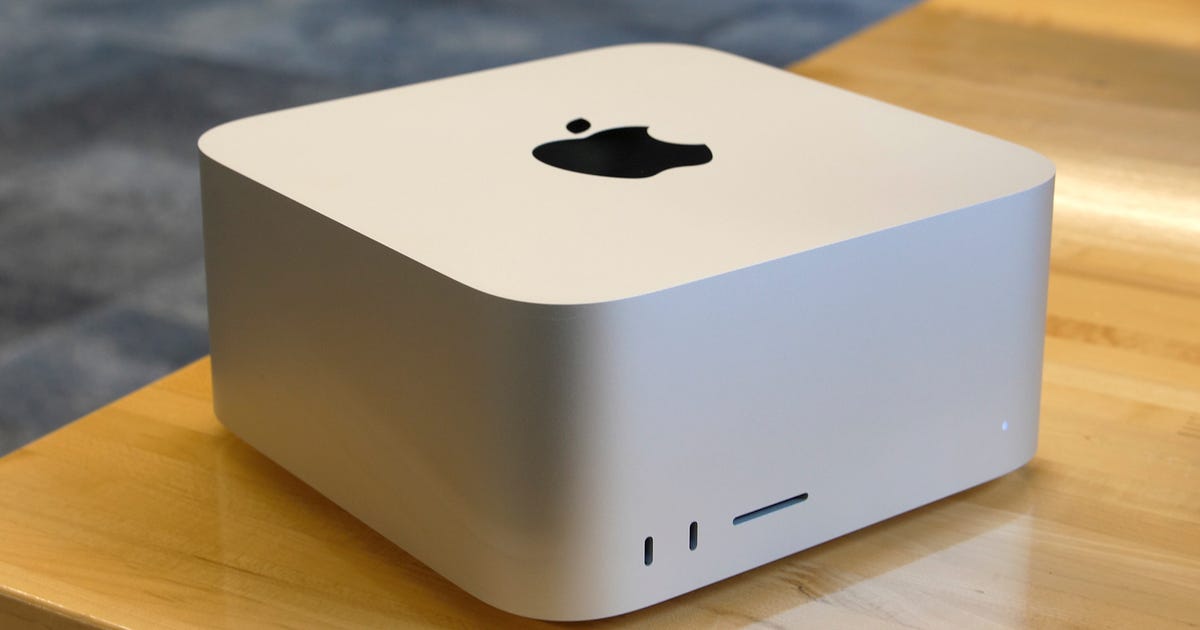
It's rare that Apple launches an entirely new product line, but that's what we have in the Mac Studio, a new desktop positioned somewhere in the huge gulf between the Mac Mini and Mac Pro.
The Mac Studio that I tested impressed me but didn't surprise me. Internally, it's very similar to the 16-inch MacBook Pro I tested and reviewed in late 2021. Both systems feature Apple's M1 Max chip, a CPU/GPU combo that's in all new Macs and some iPads. Both systems target creators of all kinds, but especially filmmakers, video editors, audio producers and coders. The biggest difference is that the MacBook Pro is a high-end laptop meant for travel and as an all-in-one solution, while the Mac Studio is a compact desktop and more likely to remain tethered to one place, connected to a display, keyboard and mouse.
Mere months ago, the M1 Max chip was the reach-for-the-stars, top-end Apple chip, outperforming the original M1 and the in-between M1 Pro. It was part of Apple's nearly complete evolution from Intel chips to its own designs, sometimes called Apple Silicon. Now, the M1 Max has moved down to become the middle-of-the-road version, because you can now get the even more powerful M1 Ultra chip in the Mac Studio.
My first inclination was to write off the $2,000 M1 Max version of the Studio as not ambitious enough, and the $4,000 M1 Ultra version as too expensive for a non-upgradable desktop. That audience is probably waiting for a new Mac Pro desktop for upgradability and future-proofing.
But speaking to other creatives, I heard the opposite -- that the M1 Max Mac Studio (try saying that five times fast) is exactly what a developing filmmaker or music producer might want. My colleague Patrick Holland told me that back in his filmmaking days, "The Mac Studio would have been ideal for me. It's $1,500 less than the 16-inch MacBook Pro. It's small enough that I could travel with it and plug it into a ton of displays, TVs and even cameras. But most importantly, the Mac Studio would have meant that I didn't need to 'design a computer' for my workflows."
The Mac Studio is paired with another brand-new product, Apple's new 27-inch Studio Display. It has a chip inside, too -- in this case the A13, as seen in the iPhone 11. That enables on-board features like Center Stage and spatial audio. Its only comparison within the Appleverse right now is the professional-level Pro Display XDR, a 32-inch display that starts at $5K, plus an extra $1,000 if you want its sold-separately stand. At $1,599, the Studio Display feels like a reasonable ask for a pro-level display, even if stand and screen options can drive up the price.
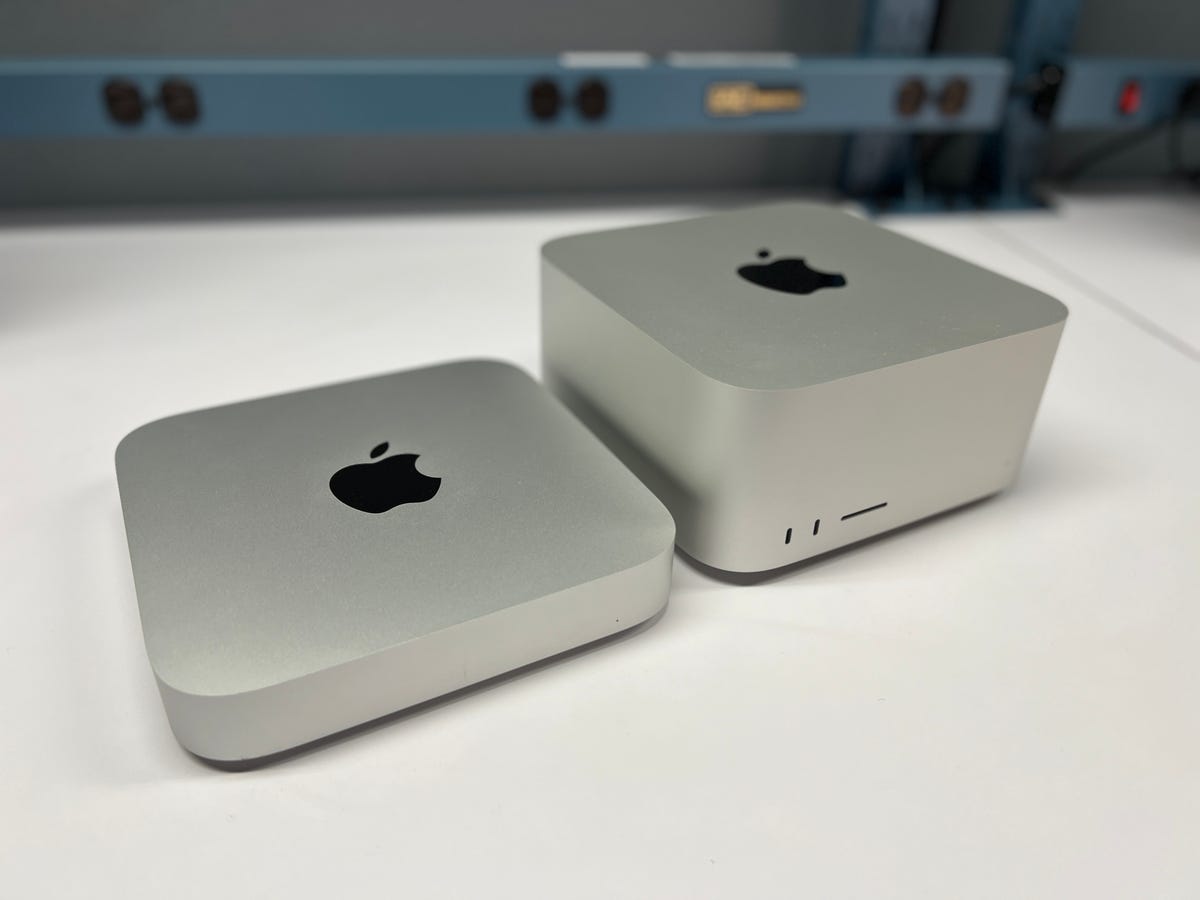
The Mac Mini (left) next to the Mac Studio.
We've only tested the M1 Max version of the Mac Studio so far, not the M1 Ultra version. That version has a bigger, heavier heat sink (that weighs about two pounds more), because the M1 Ultra is essentially two M1 Max chips joined together. Even in the M1 Max version, the case is practically half-filled with fans and cooling gear.
Besides the look -- a gently rounded square with an Apple logo on top -- there's not much common ground between the Mac Studio and the Mac Mini. In fact, I've described the Studio as two Mac Minis stacked up, but it's actually taller than that, at 3.7 inches, vs. 1.4 inches for the Mini. If anything, the price difference should tell you this is a different category: $700 for the entry level M1 Mac Mini vs. $2,000 and $4,000 for the two Studio base models. I'd like to see an M1 Pro chip version of the Mac Studio -- that might be an even better in-between level for budget-conscious creatives looking to step up.
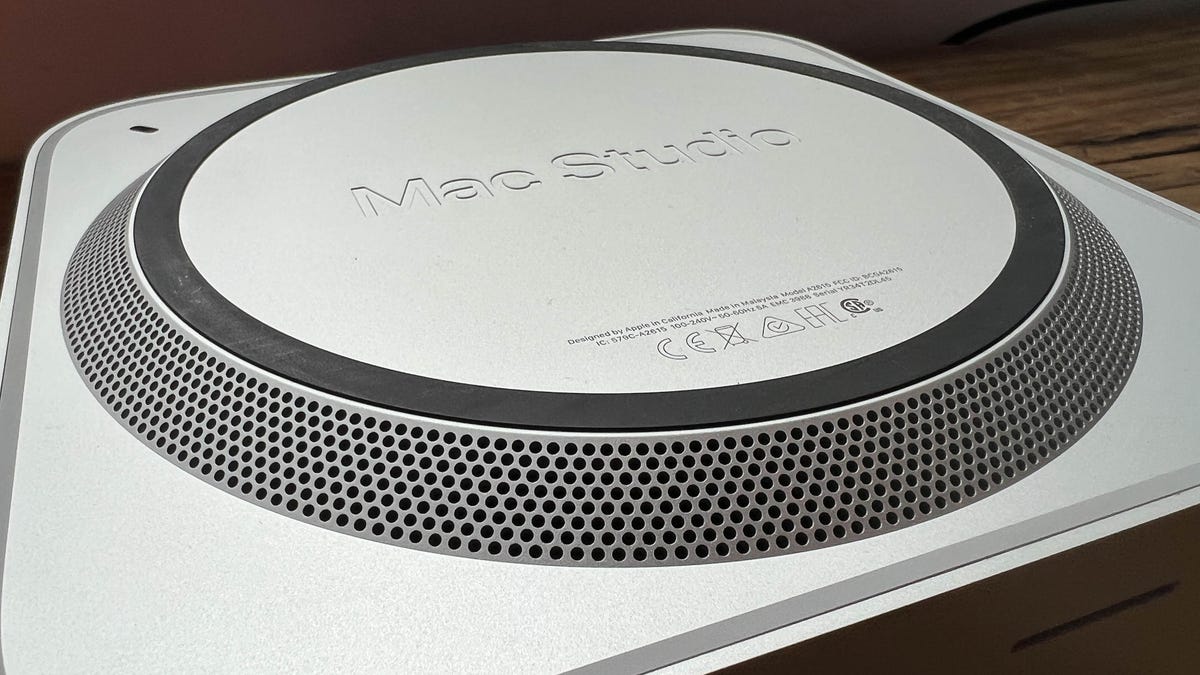
An underside view of the Mac Studio.
Dan Ackerman/CNET
Upgrades add up
The configuration we tested is a few steps up from the base model. It adds 64GB of RAM, 2TB storage and the version of the M1 Max chip with 32 GPU cores (vs. 24 GPU cores for the base model). That all adds up to $3,199. Choose your options carefully, as the Mac Studio isn't internally upgradable after the fact.
That's probably the biggest sticking point for a certain brand of creative professional. The appeal of the Mac Pro desktop, or really any tower desktop PC, is its upgradability. In some cases that just means being able to swap out a graphics card. In other cases, everything from the power supply to the CPU to the fans.
Once you get over that hurdle, if you do, a comparably configured 16-inch MacBook Pro is $4,300. The price difference accounts for the screen, keyboard and touchpad that you don't get with the Mac Studio.
The new accessories look great, but are sold separately.
Dan Ackerman/CNET
Note that the keyboard and mouse or touchpad are not included in the box. If you don't already have a set, there are new gray-and-silver versions of Apple's input accessories to go along with the Studio. The Magic Keyboard, with a number pad and Touch ID, is $200. The Magic Mouse is $100 and the Magic Touchpad (which looks great in dark gray) is $150. As a long-time Apple user (and even longer-time PC user), the Magic Touchpad is one of my all-time favorite computer input devices. The Magic Mouse is one of my least favorite. Then again, I predicted the imminent death of the computer mouse back in 2010, so what do I know?
Front loaded
The biggest innovation of the Mac Studio may be one of its simplest. Take some of the connections and put 'em on the front face. The Mini, for example, has USB-C/Thunderbolt, Ethernet, audio and other ports on the back. The Mac Studio has a similar setup, with four USB-C/Thunderbolt ports, a 10GB ethernet port, two USB-A ports, HDMI and an audio jack on the back. But there are also two USB-C ports and an SD card slot on the front, a move sure to appeal to photographers, videographers and others who hate digging around the back of a system to plug anything in. On the M1 Ultra version of the system, those front ports are Thunderbolt as well.
From its nadir, when some MacBooks included only a single USB-C for power, accessories, output, everything, we're almost in a golden age of Mac ports now. The latest MacBook Pro laptops have HDMI and SD card ports (again), for example.
Plenty of ports on the back of the Mac Studio.
Dan Ackerman/CNET
Familiar but fast
I wasn't expecting anything radically different in our basic benchmark testing when compared to the 16-inch MacBook Pro we tested last year. Both systems have M1 Max chips with 10 CPU cores and 32 GPU cores. Both include 64GB of RAM.
I'm not a full-time high-end creative pro, but especially during the Covid era I've been shooting and occasionally editing my own videos, usually in 4K. I also do some design and layout work in Illustrator and Photoshop and a little recording and mixing in Logic Pro. I sometimes design 3D printed objects in a CAD program, too.
As expected, the M1 Max Mac Studio performed similarly in our testing to the M1 Max MacBook Pro. That review includes a deeper dive into the differences between the M1 Pro and M1 Max chips, as does this M1 family performance comparison. The Mac Studio version was marginally faster in many tests, perhaps because if its better cooling.
Asus Zephyrus GX701 (Core i7-8750H, Nvidia RTX 2080 Max-Q)
16628
MacBook Pro, 14-inch, M1 Pro
10383
MacBook Pro, 13-inch, M1 (2020)
4918
iPhone 13 Pro Max (A15 Bionic)
2660
Center of attention
The Mac Studio is being pitched hand-in-hand with the Apple Studio Display, the first new Apple display since the Pro Display XDR. It's a lower-cost alternative for the XDR in some ways, but doesn't cover all of the same ground. I asked our display guru Lori Grunin to weigh in on the Studio Display as well.
At $1,600, the Studio Display is certainly more attainable than the $5,000-and-up XDR. But it's also missing some key features you might want. Specifically, it's a typical standard-definition IPS monitor with an undisclosed backlight tech, not HDR like the 1,600-nit XDR display, which uses a Mini LED backlight. The Studio Display doesn't even support HDR content, despite its 600-nit peak brightness.
The Studio Display.
Dan Ackerman/CNET
Both Apple displays top out at 60Hz refresh rates, although other Apple products, like the iPad Pro and some MacBook Pro models, have ProMotion, Apple's variable refresh rate technology that goes up to 120Hz.The XDR is two years old, so that's understandable; it's a big disappointment in the Studio. Like the XDR, the Studio Display's controls are all in software, so, for instance, if you want to disable it or power it down you have to unplug it, and it's basically unusable with anything other than a Mac, unless you want a non-smart display with no controls.
We haven't finished our formal testing yet, but eyeballing the Studio Display and XDR side by side shows excellent consistency between the colors in the reference modes. There seemed to be slightly better detail in the darkest shadows in photos on the XDR, understandable given the wider tonal range. We'll offer a full benchmarked separate review of the Studio Display soon.
The new Studio Display still has a few unique tricks courtesy of the built-in A13 chip. The speakers support spatial audio and the built-in webcam supports Center Stage, which lets the camera zoom and pan (not physically, all within the original 12MP camera image) to keep faces centered and visible.
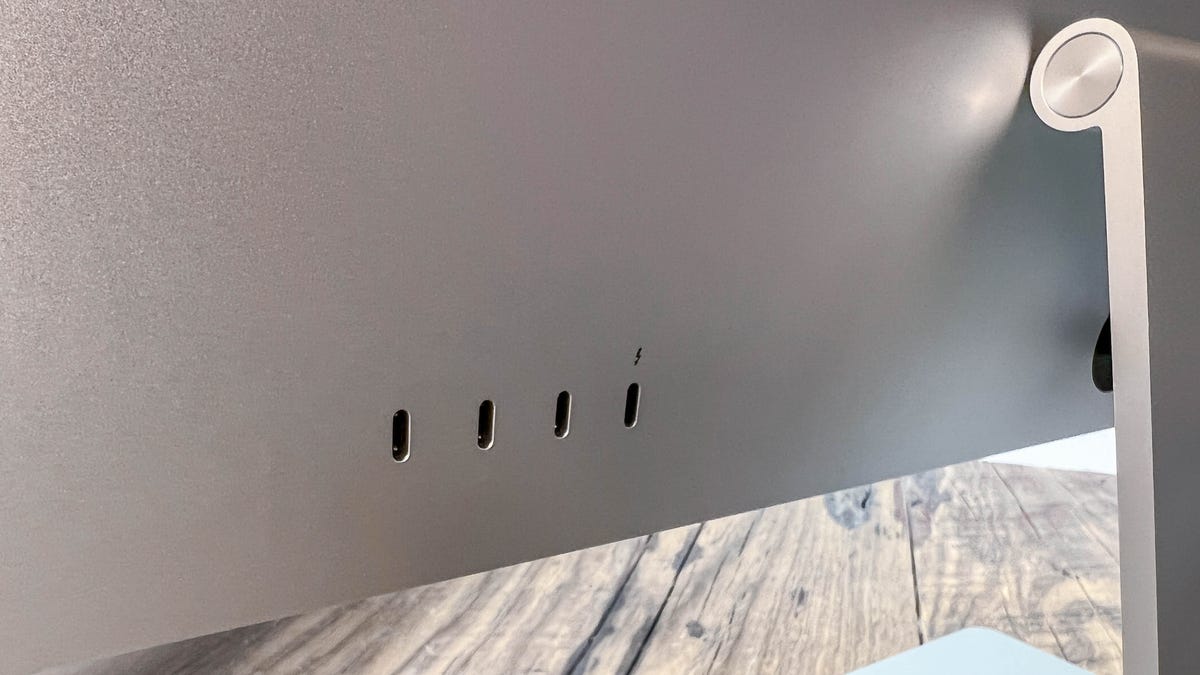
The ports on the back of the Studio Display.
Dan Ackerman/CNET
I played around with Center Stage in FaceTime, but it works Zoom and a few other apps as well. Before now, it's been limited to iPads, but I liked it on the Studio Display. With three people ducking in and out of frame, Center Stage did a reasonable job of keeping up with us, widening the image when all three of us were in-frame and zooming in when it was just me. The real trick here is the 122-degree field of view from the camera, which gives it extra space to work in. You can see the distortion of that lens if you force the Center Stage view to its widest, where the perfectly straight pillar next to me appears bowed.
Center Stage auto-adjusting the frame. Note that while there are webcam image quality issues, the softness of this image is mostly from the gif compression.
Dan Ackerman/CNET
Other Macs and even iPads can connect to the Studio Display, but will need an OS update to iPadOS 15.4. or MacOS 12.3 to use the Center Stage and other A13 features. Apple says it works with MacBook Pro laptops from 2016 and later, and MacBook Air and Mac Mini systems from 2018 and later.
Some early owners and reviewers have had issues with the webcam quality on the Studio Display. So much so that Apple is said to be readying a software fix. I found images soft, and the color not as good as an on the 16-inch MacBook Pro. Look for more on the Studio Display camera in our upcoming deep dive review.
MacBook Pro (FHD) webcam vs. Studio Display webcam.
Dan Ackerman/CNET
The in-betweeners
It's clear that Apple would like you to think of the Mac Studio and Studio Display as a perfectly matched pair of devices. If you're building a mid/high-end video production or other creative workspace, that's an appealing combination that solves a lot of problems in a single package. Together, it's a minimum investment of $3,500, and probably more. The height-adjustable stand for the Studio Display feels like a must-have, especially if you use multiple monitors and want them positioned at similar heights, which adds another $400 to the total. The Studio also has a $300 Nano-texture glass option that cuts down on screen reflection. Reflections on the standard screen weren't overpowering, and glossy screens do make everything look better -- but they can be distracting for some types of work.
The setup will cost a minimum of $3,500.
Dan Ackerman/CNET
Through a certain lens, the financial side works out. A comparable MacBook Pro can cost $1,000 more, making the M1 Max version of the Mac Studio seem more reasonably priced. The Studio Display doesn't have every high-end feature you might want, but it's right around where some comparable prosumer displays sit, although they also can come cheaper because they don't toss in the speakers and webcam. For instance, HP's new Z27xs G3 Dreamcolor monitor, a 4K color-accurate display with similar specs plus HDR support, is less than half the price. Remember that the $5,000 XDR may seem expensive next to even high-end consumer displays, but it's considered very reasonable compared to true professional models.
I'm reserving judgment on the M1 Ultra version of the Mac Studio until we can test one. I'm also leaving room in my creative pro thinking for the long-promised Mac Pro update. That system seems to change radically with each new generation, from the original tower to the black tube version to the current massive cheese grater design. Will the next Mac Pro, teased at the very end of the Mac Studio introductory webcast, follow in the Studio's footsteps and look like an elongated Mac Mini? And how will it address the issue of discrete graphics cards and upgradable components, both must-have features for many of those highest-end buyers? The GPU issue is especially important, as M1 systems don't currently support any AMD/Nvidia GPUs (so for example, you can't hook up a Black Magic eGPU to an Apple Silicon MacBook or Mac Studio).
That leaves us back here, with the Mac Studio and Studio Display. It's somewhere in-between the future Mac Pro and standard M1 Macs, and it'll probably appeal to people who find their work or their budget are similarly in-between those two extremes.